
Halloween MacBook Wallpapers 2026: Free 4K Downloads
Halloween 2026 falls on Saturday, 31 October. Here are ten free spooky wallpapers in 4K for MacBook Air and MacBook Pro: glowing jack-o'-lanterns, black bats, candlelit pumpkins and an eerie skull scene. All are free with no watermark.
Every year, a few weeks before 31 October, people start looking for a Halloween wallpaper. A new desktop picture is the easiest way to join the fun, because you see your MacBook screen many times a day. When the season ends, you can switch back with one click.
We chose ten wallpapers for different Halloween moods: dark and spooky, warm and cosy, and bold orange and black. All are wide landscape images in 4K, so they fit MacBook Air and Pro screens and stay sharp on Retina displays.
Dark scenes with glowing orange look the best on a MacBook Pro, where the high contrast makes pumpkin light really stand out. Choose a picture with open space on the left or right so desktop icons stay easy to read. Want phone wallpapers too? Read our guide to the best Halloween wallpapers for iPhone and Android.
🎃 What Makes a Great Halloween Wallpaper?
- Strong orange glow against black or deep blue
- One clear subject: a pumpkin, a bat or a house
- Open space for desktop icons
- Calm top edge so the notch and menu bar stay clean
- 4K resolution to keep flames and fog sharp
💻 How to Set a MacBook Wallpaper
- Download the image from the wallpaper page and open System Settings → Wallpaper
- Click Add Photo and choose the downloaded file
- Select Fill Screen so the picture is never stretched
- Turn on Show on all Spaces if you use several desktops
Before the list, here is a short guide so you can pick the right wallpaper for your MacBook, your desktop and your workday. Halloween wallpapers are different from normal wallpapers because they use strong orange, deep black and sometimes small glowing details. These can look amazing on a Mac, but a wrong choice can make icons hard to see or make the menu bar look messy.
How to Choose a Halloween Wallpaper for Your MacBook
Start with your screen. A MacBook Pro 14 or 16 has a mini-LED display with very high contrast, so dark scenes with a glowing pumpkin look rich and deep. A MacBook Air has a bright LCD, so orange and black graphic designs, like the bat wallpaper, look clean and fresh. Neither is an OLED screen, but dark Halloween pictures still look excellent on both.
Next, think about your desktop. If you keep many files and folders on the desktop, pick a wallpaper with a quiet area on one side. If your desktop is clean, you can use a busier scene with more detail. Finally, check the top edge. The menu bar and the notch sit there, so a dark or soft top looks best, while a bright object at the top can look cut off.
🎃 Quick Picking Guide
- Want maximum spooky: choose wallpapers 01, 02 or 06
- Want cosy Halloween: choose wallpaper 03, it also works for the whole autumn
- Want clean and bold: choose wallpaper 04 with an orange accent colour
- Want a classic look: choose wallpaper 05
- Many desktop files: choose a picture with a dark, quiet side
Top 10 Halloween MacBook Wallpapers

Glowing Jack-o'-Lantern in a Mysterious Forest
A carved pumpkin glows warm orange between dark trees. This is the most atmospheric picture in the list, and it works best on a MacBook Pro, where the mini-LED screen keeps the black areas deep and makes the glow stand out. The forest edges are dark, so desktop icons on the left or right remain easy to read. Choose this one if you want a true spooky mood without too much clutter.
View & Download
Spooky Jack-o'-Lantern with Smoky Background
A glowing jack-o'-lantern surrounded by drifting smoke on a dark night. The smoke adds movement and a cinematic feel, while the bright face gives one clear subject. Because the top of the picture is dark and soft, the menu bar and notch blend in naturally. A strong pick for people who like dramatic, high-contrast Halloween scenes.
View & Download
Candlelit Jack-o'-Lantern in Fallen Leaves
A creepy pumpkin lit by candles and resting among fallen leaves and twigs. It mixes Halloween with the cosy autumn mood, so it also suits you after 31 October, through early November. The warm light looks rich on a bright Air display, and the dark ground leaves room for files and folders along the bottom.
View & Download
Black Bats on an Orange Background
Black paper bats spread across a bright orange background. It is the simplest and most graphic wallpaper here, with no fine detail that can look busy under icons. It is also the best choice if you use a light desktop and want Halloween colour without a dark photo. Pair it with an orange accent colour in System Settings for a matching look.
View & Download
Two Glowing Jack-o'-Lanterns in the Dark
Two illuminated pumpkins in deep darkness, with their faces glowing against the black. This is the classic Halloween night picture. The very dark background keeps your windows and menu bar readable, and the two lights give a natural focus point. A safe pick if you want something spooky that still looks clean and professional.
View & Download
Pumpkins, Candles and a Skull
An eerie arrangement of pumpkins, candles and a skull on dark grass. It has more detail than the other wallpapers, so it rewards a 4K file on a Retina screen, where you can see every flame and texture. Use it with desktop icons placed on one side, and keep the other side open to enjoy the scene.
View & Download
Spooky Pumpkin Glowing on Dark Grass
A carved pumpkin glows in the dark on a grassy ground. The scene is simple and strong, with one clear subject and a dark, soft background. It is a very safe choice for a MacBook desktop, because the dark surroundings keep icons readable and the single glow draws the eye without any clutter.
View & Download
Jack-o'-Lantern Covered in Spider Web
A lit jack-o'-lantern wrapped in spider webs in a dim indoor scene. The fine web detail looks excellent in 4K on a Retina screen, and the orange glow gives a classic haunted-house mood. Choose it if you like small details and a more creepy, close-up look.
View & Download
Little Ghost Hanging in an Autumn Park
A small white ghost decoration hangs from a branch in a soft, blurred autumn park. This is the friendliest picture in the list, with a light and gentle mood instead of a scary one. It is perfect for people who want a cute Halloween desktop for work, school or a shared laptop.
View & Download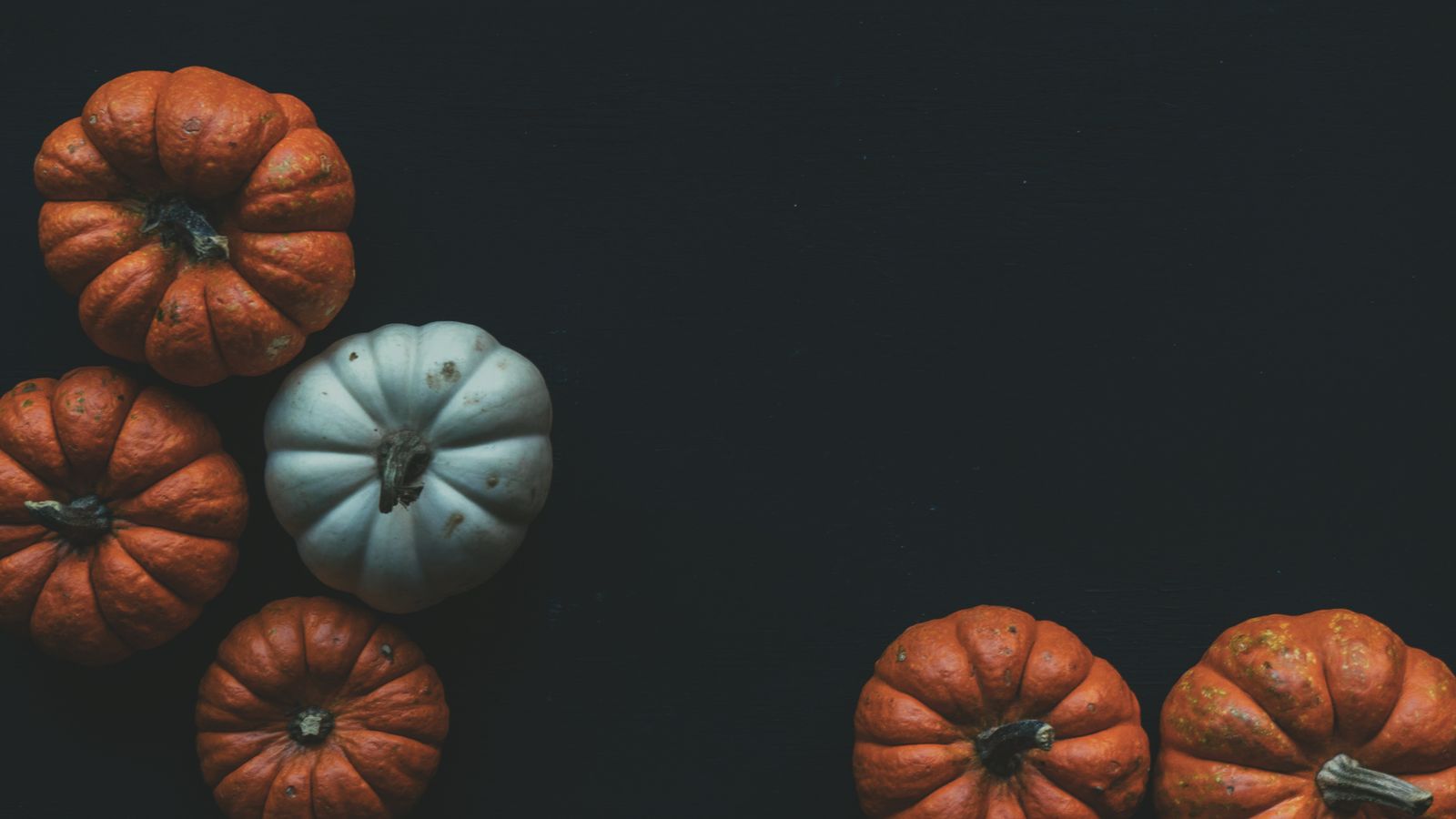
Orange and White Pumpkins on a Dark Backdrop
A collection of orange and white pumpkins in front of a dark background. The mix of colours gives a clean, modern harvest look, and the dark backdrop keeps your files and Dock easy to see. It also works after Halloween as a general autumn wallpaper.
View & DownloadMacBook Wallpaper Size: Which File Should You Download?
A sharp wallpaper starts with the right file size. The native screen resolution of the MacBook Air 13-inch is 2560×1664, the Air 15-inch is 2880×1864, the MacBook Pro 14-inch is 3024×1964 and the MacBook Pro 16-inch is 3456×2234. A 4K wallpaper (3840 pixels wide) is larger than all of them, so macOS can scale it down cleanly. Always download the biggest file available from the wallpaper page, because a small file is stretched on a Retina display and looks soft.
Also keep the aspect ratio in mind. MacBook screens are close to 16:10, while many photos are 3:2 or 16:9. When the ratio is different, macOS crops the edges or adds borders. Choosing Fill Screen keeps the picture full without stretching it, with a small crop at the sides or top.
How to Set a Halloween Wallpaper on Mac
💻 Step by Step (macOS Ventura, Sonoma, Sequoia and later)
- Download the 4K file and save it to your Downloads folder
- Open the Apple menu, then System Settings → Wallpaper
- Click Add Photo and choose the downloaded image
- Pick Fill Screen from the fit options
- Optional: turn on Show on all Spaces so every desktop uses it
On older versions of macOS, open System Preferences → Desktop & Screen Saver, click the plus button, and choose the folder that holds the image. If you use two displays, set the wallpaper for each screen separately, because a picture made for a laptop screen can look different on a wide monitor.
Make the Whole Mac Match the Halloween Mood
A wallpaper looks best when the rest of the desktop supports it. Open System Settings → Appearance and switch to Dark, so windows, the Dock and the sidebar match the dark scene. You can also change the accent colour to orange for buttons and highlights. Keep the Dock small or on auto-hide, so it does not cover the lower part of the picture.
If your desktop gets messy, right-click it and choose Use Stacks. This groups files by type and keeps the scene clean. When Halloween ends, save the current wallpaper before changing, so you can go back in two clicks.
Common Mistakes With Halloween Wallpapers
⚠️ Avoid These
- Using a small file: low resolution images look blurry on Retina screens
- Bright subject under the notch: it looks cut off and distracting
- Busy picture with many icons: files become hard to find
- Stretching the image: always use Fill Screen, not Stretch
- Sharing through chat apps: apps like WhatsApp compress the image and reduce quality
- Using a screenshot of the preview: it is much lower quality than the original file
Why Photos on WallNest HD Are Safe to Use
The pictures in this guide come from the free-to-use Pexels library, and each one opens on its own WallNest HD page with a free full-size download. There is no sign-up and no watermark. You can use them as a personal desktop wallpaper, on a second monitor or as a background on a shared work laptop, without worrying about hidden logos.
When to Put Up and Take Down a Halloween Wallpaper
Most people switch to a Halloween wallpaper in the first half of October and keep it until 1 November. Searches for Halloween wallpapers grow quickly in the last two weeks before 31 October, so now is the best time to change your desktop. If you like the cosy pumpkin and candle pictures, you can keep them through November as part of an autumn setup, because they do not look out of place after the holiday.
A good habit is to keep a folder called Wallpapers with your seasonal pictures, such as Halloween, Diwali, winter and summer. Then changing your Mac for the next season takes only a minute, and you always know where the original 4K files are. If you have more than one Mac, such as a work laptop and a personal one, you can use a different Halloween picture on each, so the two screens do not look the same.
Common Questions
When is Halloween 2026?
Are these Halloween MacBook wallpapers free?
What is the best size for a MacBook Halloween wallpaper?
Do they fit MacBook Pro and MacBook Air?
How do I set a Halloween wallpaper on my Mac?
How do I switch back after Halloween?
Which Halloween wallpaper is best for the MacBook notch?
Why does my wallpaper look blurry on my MacBook?
Can I use these wallpapers on a Windows PC or monitor?
Do dark Halloween wallpapers save battery on a MacBook?
The photos in this guide come from the free-to-use Pexels library. Every wallpaper opens on its own page with a free download, no watermark and no sign-up. More MacBook guides: Best MacBook Wallpapers 4K 2026, MacBook Pro 14 & 16 Wallpapers, MacBook Air M3/M4 Wallpapers, Dark & Minimal MacBook Wallpapers. Also browse our minimal wallpapers, dark wallpapers and AI wallpapers.